



Self Check-in
With us, you can check in completely flexibly and easily. Our self-check-in allows you to access your apartment in just a few steps, whenever it suits you best.
To ensure your arrival goes smoothly, you'll find a step-by-step tutorial here, including videos, where we explain everything:
Step 1:
Check your arrival information
After you have booked with us, you will receive all the important information about your upcoming stay in Apartment 040 via email. Please read this carefully. This email will also contain the door code for the main entrance to the building.
Step 2:
Start the check-in process
You'll find our check-in terminal in the lobby of Apartment 040. To start the process, simply click on "start now".
Step 3:
Tell us which booking it is.
First, we need your last name and your reservation number to identify your booking. You already received your reservation number from us by email.
Step 4:
Share your personal information with us
Now you select your nationality and then your personal details.
Next, you enter your home address.
You will now see an overview of your details. If everything is correct, click on "Check-in" and your apartment will be officially occupied.
Step 5:
Your room key code
To code your own room key, click on "Create room key", take a card from the tray and place it on the encoder. After a short moment, it will be ready. If you wish, you can create additional cards.
Finally, click on "Complete check-in" and you can go into your apartment.
Check-Out
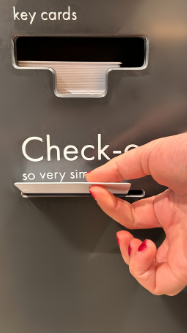
When it's time to check out, simply drop your room keys into the slot labeled "Check-out".
That's all you need to do. We'll take care of the rest for you.
Frequently Asked Questions
Here you will find answers to frequently asked questions about the self check-in process. We are available to answer any further questions you may have.
